
You’ve spent hours perfecting that one graph, and now you need to show your boss the source. But flipping to another slide feels clunky, like driving a car with square wheels. Enter the hyperlink: the tiny, invisible wormhole that connects your words to other worlds.
Inserting one is shockingly easy. In fact, it’s so simple that it’s a crime more people don’t do it. I’m pretty sure hyperlinks were invented by a bored wizard who hated clicking through menus.
Step 1: Pick Your Victim (Text or Image)
First, highlight the text you want to turn into a portal. It can be a phrase like “secret data” or “the funny cat video.” You can also click on an image—yes, even that clipart of a confused-looking llama.
Right-click on your chosen victim, and a magical menu appears. It’s like the genie’s lamp of productivity. Look for the option that says “Link” or “Hyperlink.” Click it. Do not be afraid—your computer won’t explode.
Step 2: The "Choose Your Own Adventure" Window
A new box pops up, and it smells faintly of possibilities. Here’s where the fun begins. You have three main choices, and each is a different flavor of chaos.
Option A: Link to a Website. Type or paste a URL (like www.dogsridingbikes.com). Boom—click during your presentation, and you’re live on the internet. Warning: Make sure you have Wi-Fi, or you’ll just stare at a loading circle like a disappointed ghost.
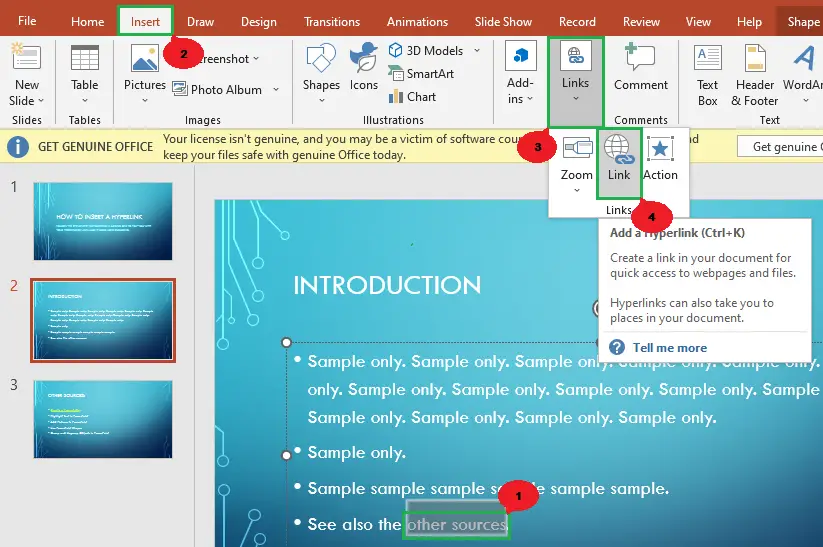 Insert a Hyperlink in PowerPoint: Complete Guide (2026)
Option B: Link to Another Slide. This is my personal favorite. You can make a “Next Slide” button that jumps to slide 47, skipping the boring part where you talk about quarterly earnings. It’s like teleportation for your audience’s brain.
Option C: Link to a File. Want to open that 300-page PDF of legal disclaimers? Hide it behind the word “fun.” Click, and the file opens like a trap door. Sneaky, but effective.

